Case study · Synaptic

A collaborative document editor where the AI shows you the exact sentence it got each answer from.

And where private documents stay private — even from the AI.

A self-directed personal project, designed, built and deployed solo. Not client work.

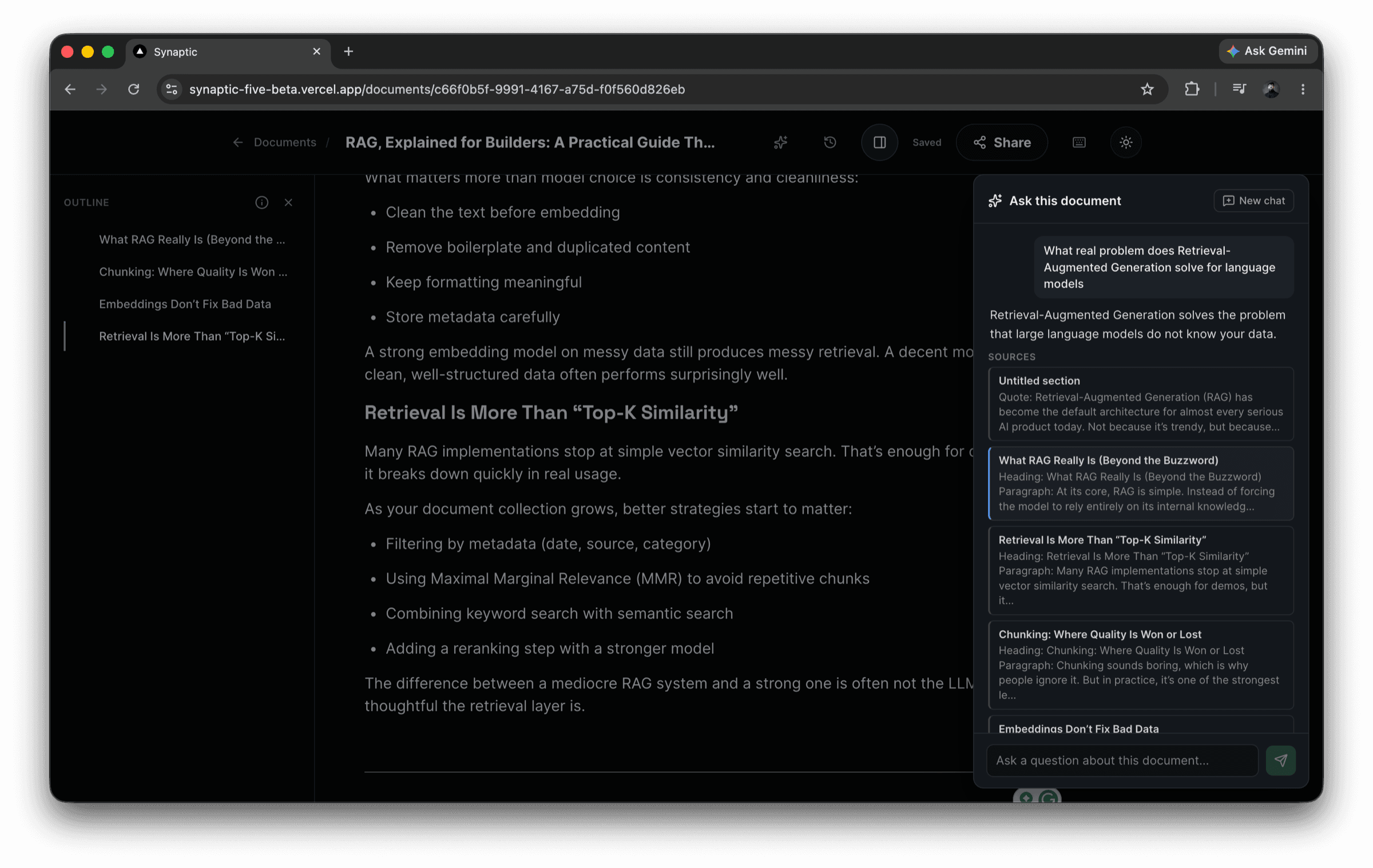
The Synaptic editor with the “Ask this document” panel open on the right, showing an answer about Retrieval-Augmented Generation above a list of cited source passages drawn from the document.

The problem

Two flaws you can feel in most “ask AI about your docs” tools.

01

You can’t check the answer

The assistant tells you something and points at a vague source. There is no way to confirm it did not simply make it up.

02

It can leak what you were never shown

When a document is shared with some people and not others, the AI search usually ignores who is asking — so content reaches readers who were never given access.

Synaptic was built to fix specifically those two things.

What I built

The scope of the product.

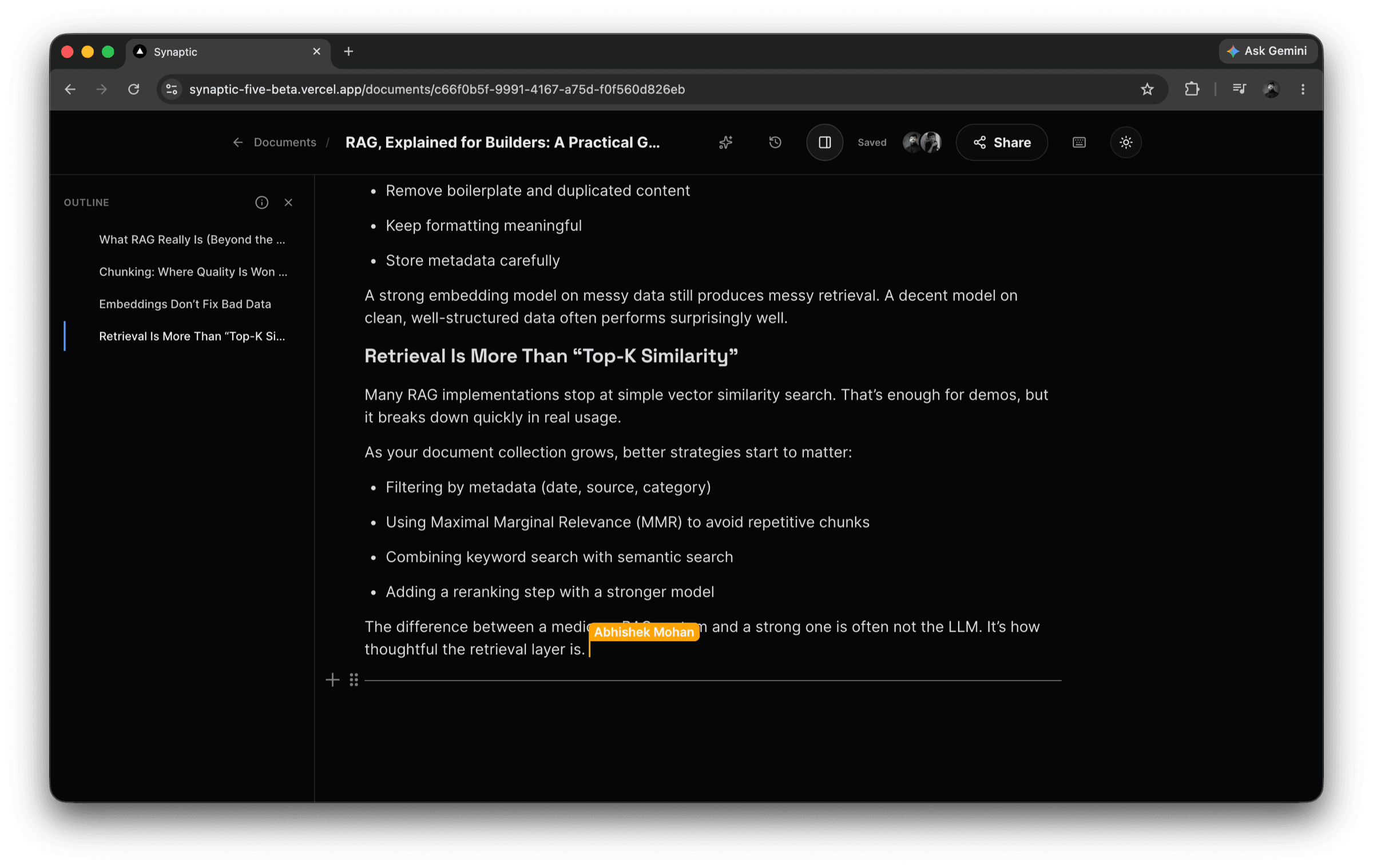
Two people editing the same Synaptic document at once, with another collaborator's named cursor labelled in the middle of a paragraph.

Real-time collaborative editing

Several people in one document at once, with live cursors and no one overwriting anyone else's work.

The Synaptic assistant panel answering a question, with each cited source passage listed beneath the answer and linked back into the document.

An assistant that cites its evidence

Ask a question about the document and the answer comes with the exact passage it used — click it to jump straight there.

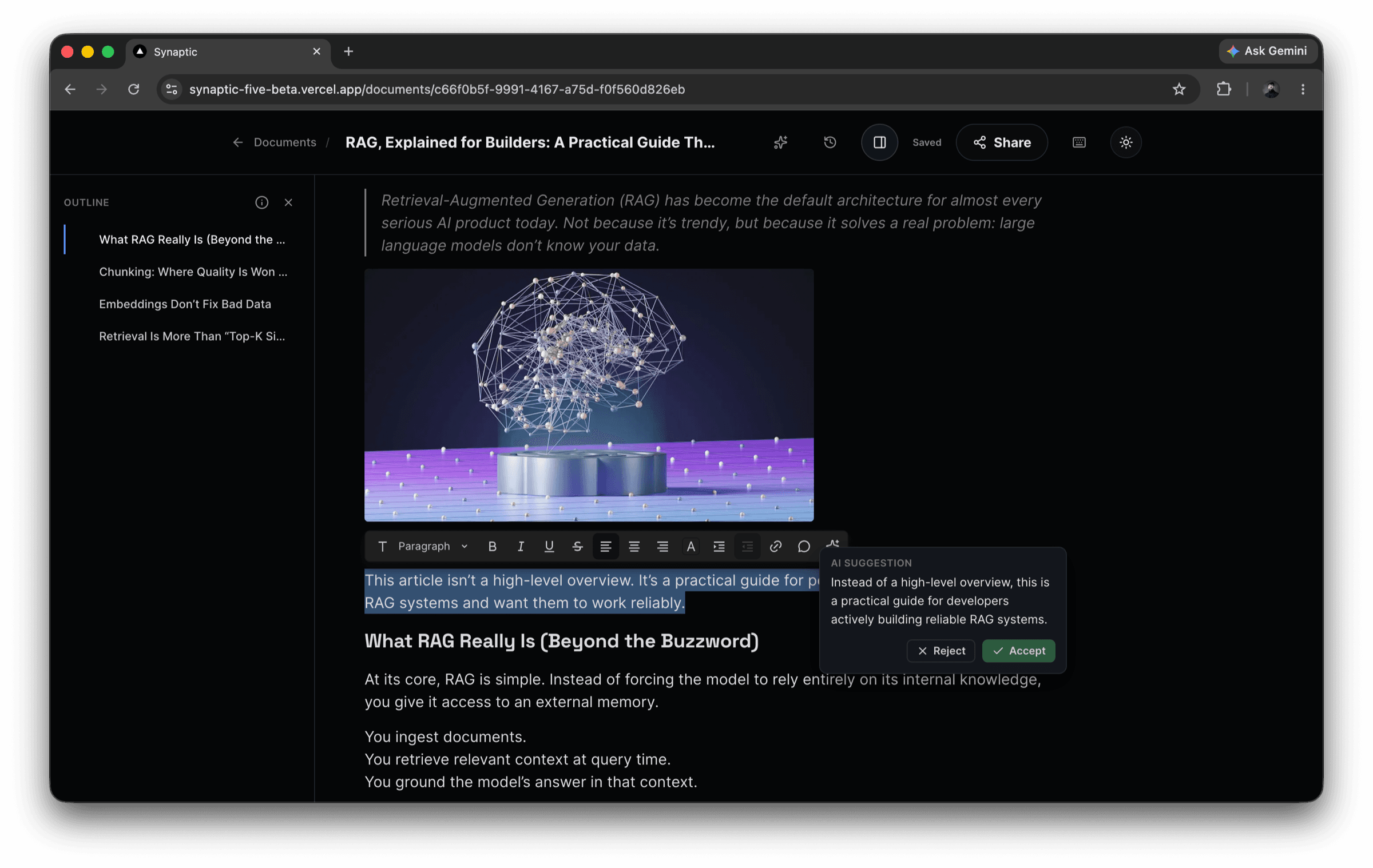
A selected sentence in the Synaptic editor with an inline AI suggestion popover offering a rewritten version, alongside Accept and Reject buttons.

Rewrite, expand, tighten

Select any text and hand it to the assistant for a rewrite, an expansion or a tightened version.

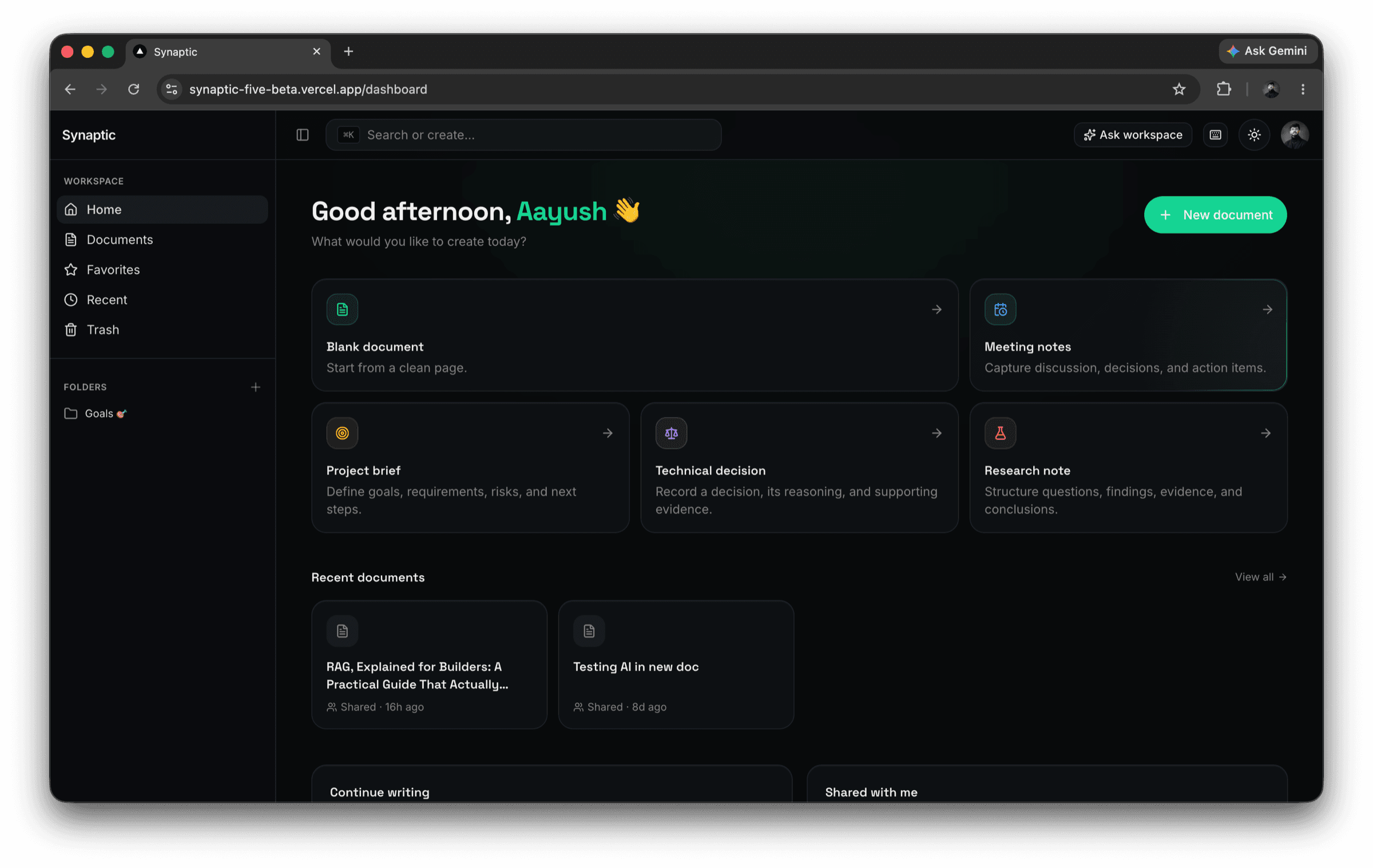
The Synaptic dashboard showing a workspace sidebar with folders and favourites, document templates, and a list of recent documents.

Accounts and workspace

Sign-in, user accounts, a dashboard, folders and favourites.

Sharing with permission levels

Invite people at different levels of access, and revoke that access instantly — mid-session, not next login.

Full version history

Browse every earlier state of a document and restore any of them.

Search inside the content

Search across what the documents actually say, not only their titles.

Shipped end to end

Designed, built and deployed to production, solo.

How it works

One walkthrough, start to finish.

  1. You type.

  2. Everyone in the document sees it instantly.

  3. The document is saved and indexed in the background.

  4. You ask a question.

  5. The system finds the relevant passages you personally have permission to see.

  6. The assistant answers using only those passages.

  7. The answer links back to the live passage in the document.

For engineers

The engineering behind it

Everything below is written for engineers. If you came to judge the product, you already have what you need — this is where the decisions, the rejected approaches and the known edges live.

Hardest problems

Problem, why it’s hard, how it was resolved.

01

Reconciling live collaborative state with persisted state

Why it’s hard

The Liveblocks/Yjs session and the Postgres-backed autosave are two sources of truth that must agree. A late-returning save can clobber newer content, and a reload can race the room hydration.

Resolution

Saves are serialized through a coalescing latch, so an in-flight save cannot be overwritten by a stale one. A seeding guard prevents an empty document from being silently re-seeded over live state on reload.

02

Making citations resolve to the correct live block

Why it’s hard

A citation is worthless if it lands near the evidence instead of on it. The easy and wrong answer is pointing chunk metadata at the section's heading block — cheap to store, and consistently off-target.

Resolution

The actual first evidence block is tracked separately and carried through chunk merging and splitting, with an ordered fallback chain for targets that no longer exist after an edit.

03

Keeping retrieval permission-scoped

Why it’s hard

Nearly every RAG tutorial reaches for the service-role key on the indexing and query path — faster, and permission-blind. That is exactly how a retrieval layer leaks documents its caller was never granted.

Resolution

RAG indexing and querying go through the same Postgres Row Level Security path as every other read. There is no service-role key anywhere in the application, including the AI code paths.

04

Invalidating live sessions on permission change

Why it’s hard

Gating access at page load leaves a revoked collaborator inside an open realtime connection, still receiving updates.

Resolution

Revoking a collaborator forces their open realtime connection to re-authenticate, so the downgrade lands in their current session rather than only on the next page load.

05

One save event, three consumers

Why it’s hard

Persistence, RAG re-indexing and version snapshots all hang off the same save. Fire them naively and they race, duplicate work, or index a document state that was never persisted.

Resolution

The three are coordinated off a single save event and ordered so re-indexing and snapshotting run against persisted state rather than racing it or duplicating work.

Found and fixed

A real security bug

Why it’s hard

The RLS design uses SECURITY DEFINER helper functions to avoid circular policy evaluation. Postgres and PostgREST expose every function in the public schema as a callable RPC, so those helpers were callable by any authenticated user as a role and ownership oracle.

Resolution

The helpers were moved out of the exposed schema.

20260910000000_restrict_permission_helper_rpc_access.sql

Architecture

The path of a keystroke.

Writing and retrieval are separate paths. They share persisted, permission-enforced data — not a single continuous pipeline.

Write path · document changes

Client editor

the browser, where a keystroke starts

Collaborative state

Liveblocks + Yjs over BlockNote

Debounced, coalesced autosave

also runs in the browser

browser writes directly — RLS is the only gate

on save success

Next.js API route

/api/rag/index

RAG chunking + embedding

write path only

chunks written back through RLS

Supabase / Postgres

Row Level Security on every query

documents + versions

persisted document state and history

document_chunks

pgvector — an extension in this same database

This is the only place the write path and the read path meet. There is deliberately no server between the autosave and the database — the browser holds a Supabase client carrying the Clerk token and writes straight to Postgres. RLS is what makes that safe.

permission-scoped retrieval reads document_chunks

Read path · triggered by a question

User asks a question

in the assistant panel

Next.js API route

the browser stops here

Rate-limit check

Postgres-backed

Permission-scoped retrieval

RLS-enforced similarity search

Gemini generation

grounded in the retrieved chunks only

Cited answer

each claim carries its evidence passage

Live-block navigation

by stable block ID

Jump to the live block — the citation navigates back into the client editor at the top of the write path, and the loop closes.

Identity · separate from data flow

Clerk identity

issues the access token

Supabase / Postgres

identity → RLS evaluates this

Liveblocks auth endpoint

authorizes the realtime room

Data flowAuth / permissionsUser navigation

Notes · Supabase and version history

Version history is append-only at the RLS level

No role — including the document owner — holds UPDATE or DELETE on the versions table. History cannot be rewritten by the application, only added to.

Diffs keyed on stable block IDs

Block-level diffs use BlockNote's stable block IDs, so restoring a version does not scramble the citation targets pointing into that document.

Judgment and known limits

Knowing where the edges are is part of shipping it.

This is deliberate practice, not a defect list — documenting a system's limits is part of delivering it, and the same discipline carries into client work.

Rate limiting fails open, deliberately

It is a Postgres-backed atomic counter, so it holds across multiple server instances rather than living in per-process memory. It fails open: availability chosen over strictness, at the cost of a narrow unenforced window.

Version restore is not hardened against a concurrent editor

Restore does not yet guard against another collaborator editing the same document at that instant. Safe for the common single-editor case, not for that race.

Test coverage is targeted, not comprehensive

A node:test suite covers RAG chunking, citation and search logic. There is no E2E or component suite yet.

Error reporting is deliberately narrow

Sentry runs with a single error-capture call site and a closed error-context type with no free-form data field. SDK data collection is disabled across every category, including AI prompt and response capture.

None of this is a claim of perfect security.

Stack

Next.js 16 (App Router, Turbopack)React 19ClerkSupabase / Postgres — RLS as the only enforcement pointLiveblocks + YjsBlockNoteGemini (embeddings and generation)pgvectorSentryTailwind CSS + shadcn/ui

A complete product, shipped solo: product thinking, real-time systems, an AI feature that is verifiable rather than decorative, database-level security, and production deployment.